
Hello everyone!
I’m Nata, and today we’ll be discussing the different types of spot orders available on Binance. We’ll cover when to use each order type, including Limit Orders, Stop-Limit Orders, and OCO (One-Cancels-the-Other) Orders, as well as how to set them up correctly.
Market Order
Let’s start with the simplest order type — the Market Order.
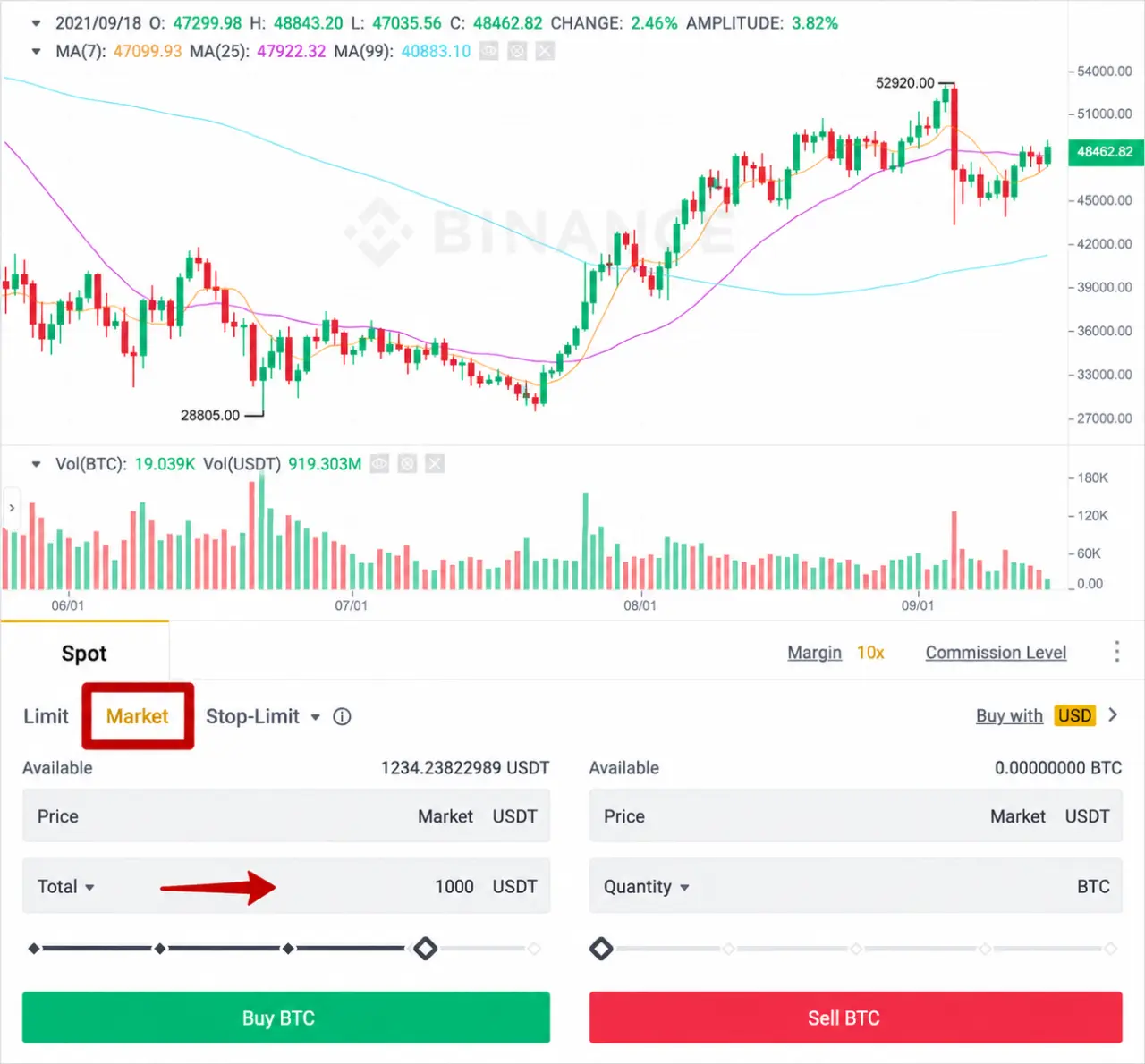
A market order allows you to buy or sell an asset immediately at the best available price in the market. When traders say “buy at market” or “sell at market,” this is the order type they are referring to.
If your goal is to enter or exit a position instantly, select Market Order and specify only the amount you wish to buy or sell. For example, if you want to purchase Bitcoin worth 1,000 USDT, simply enter 1,000 USDT in the order form. The order will be executed immediately at the current market price, which in our example is approximately 48,462 USDT per BTC. If you want to sell instead, enter the amount in the sell section and click Sell.
It is important to understand that the final execution price may differ slightly from the price displayed on the screen. Market orders are matched against available orders in the order book, starting with the best available prices. As a result, the execution price depends on current market liquidity. The larger the order size, the greater the potential difference between the displayed market price and the average execution price, a phenomenon commonly known as slippage.
So when should you use a Market Order?
A market order is most suitable when execution speed is your priority and you want to buy or sell an asset immediately at the best available market price.
Limit Order
The next order type we will discuss is probably the most commonly used order in the market — the Limit Order. A limit order is an order to buy or sell at a specific price.
Buying with a Limit Order
Let’s imagine a situation where you do not yet own any Bitcoin and you want to buy it at an attractive price (see the image). The price of Bitcoin is 48,443, but you would like to buy it cheaper, at 40,510. A limit order is exactly what you need!
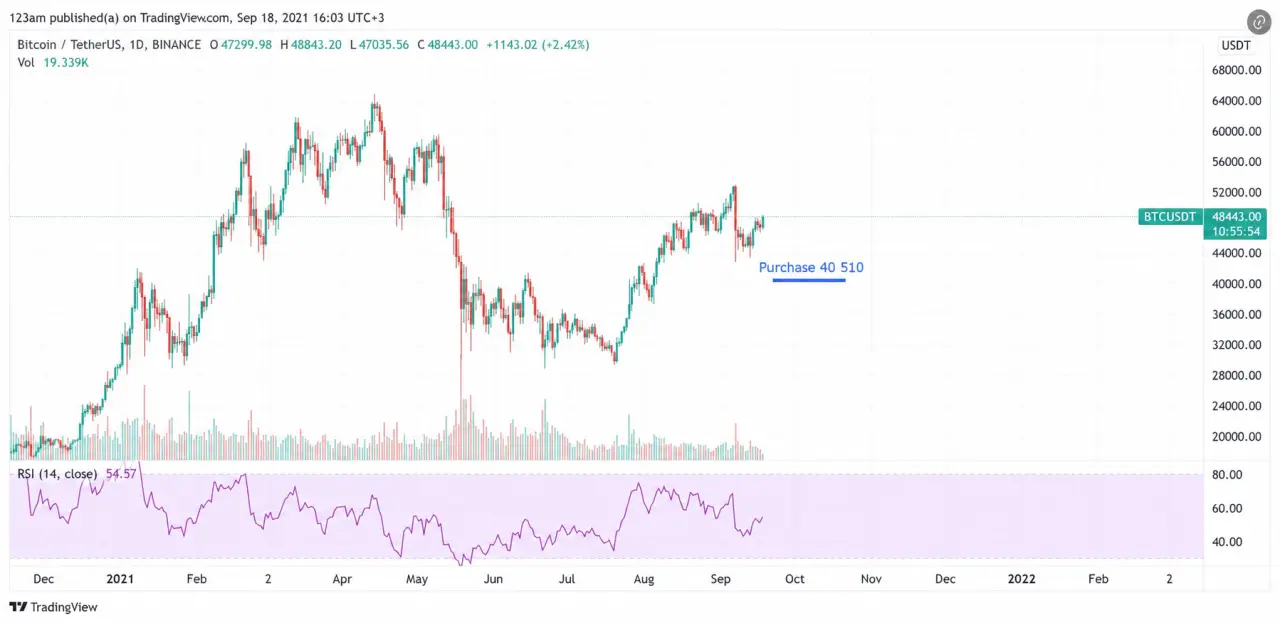
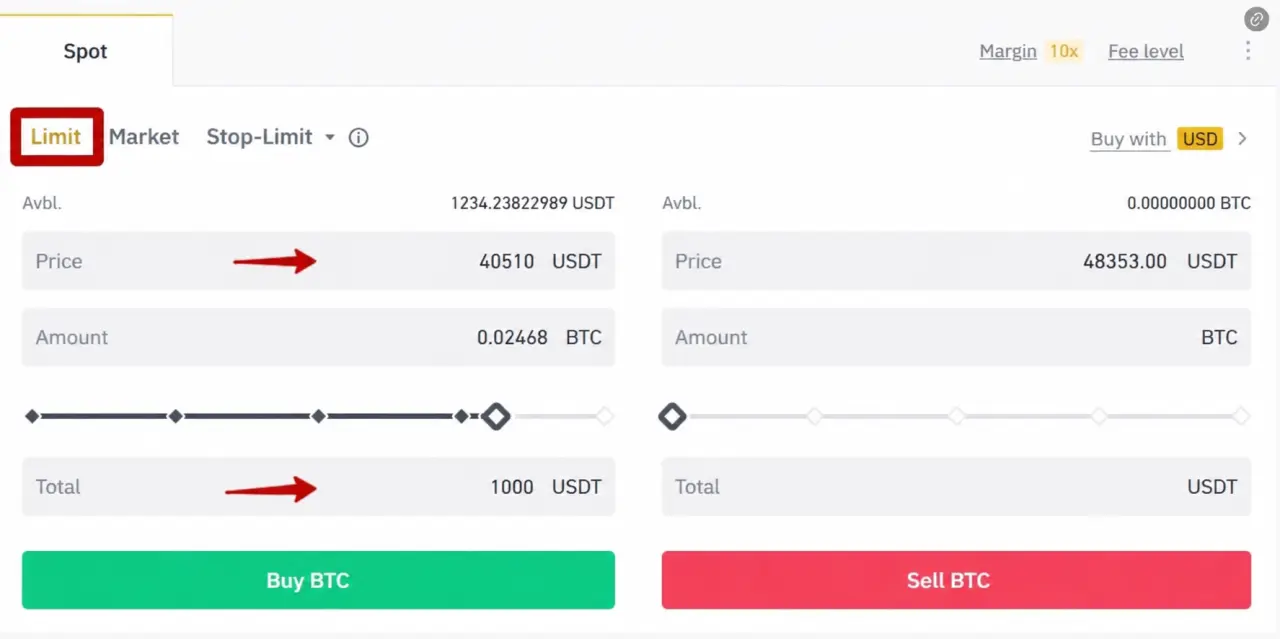
Simply enter the price you are interested in — in our example, 40,510 — and the amount. In our example, we are buying for 1,000 USDT, although you can also enter the amount of Bitcoin, and the system will calculate how much USDT will be required. Then click the Buy button.
Selling with a Limit Order
Now let’s imagine that you already have Bitcoin and you want to sell it at a very attractive price (see the image). The price of Bitcoin is 48,464, but you want to sell it higher, at 58,010. In our setups, we call this TP1, TP2, TP3, or take profit. In this case, we use a limit order.
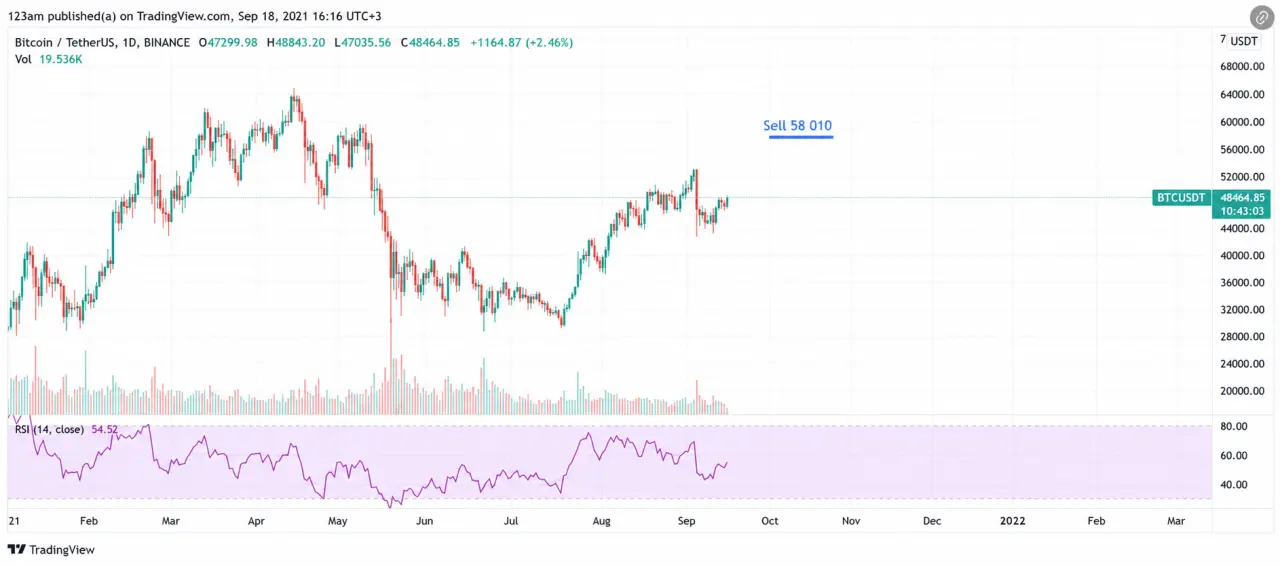
Everything is simple: enter the price you are interested in — in our example, 58,010 — and the amount (in Bitcoin or in USDT). In our example, we are selling for 1,000 USDT.
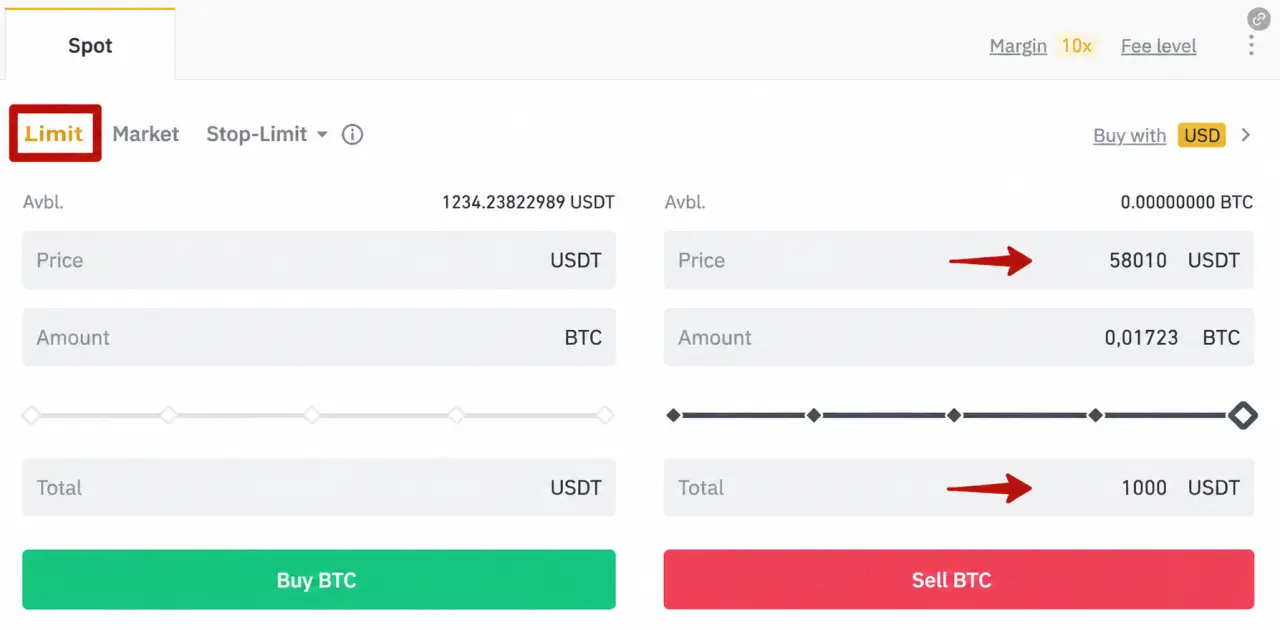
Important Nuances
Seems simple, right? This is where the nuances begin.Everything described above works when you place a buy order below the current market price and a sell order above the current market price.
However, if the market price is 45,000 and you place a buy order at 48,000 (above the current price), the order will automatically purchase the entire amount at the best available price for you at that moment — in simple terms, it will behave like a market order.
The opposite is also true: if the current market price is 45,000 and you place a sell order at 42,000 (below the current price), it will again behave like a market order, and your position will be sold at the current market price.
So when should you use limit orders?
- When you want to buy at a lower price than the current market price;
- When you want to sell significantly above the current market price (your take-profit level).
Stop-Limit Order
What if you want to buy a breakout or sell using a stop-loss? That’s exactly what stop-limit orders are for.
The most important thing is to understand how they work and not be intimidated by them. In short, this order type allows you to set a trigger price (the Stop), and when that price is reached, a limit order (the Limit) is automatically placed. Most commonly, stop-limit orders are used when you want to buy above the current market price (a breakout trade) or sell below the current market price (a stop-loss).
Setting a Stop-Loss (Selling Below the Current Price)
Every trading setup from our analysts includes a stop-loss (SL) — the price at which we close the position. A stop-limit order is the tool you use to place that stop-loss.
Let’s imagine you’ve already bought Bitcoin (you’re “in a position”), but you want to protect yourself. You have identified (or our analysts have identified) a certain level where, if the price reaches it, the market is likely to fall further. In that case, you would prefer to exit the position and sell.
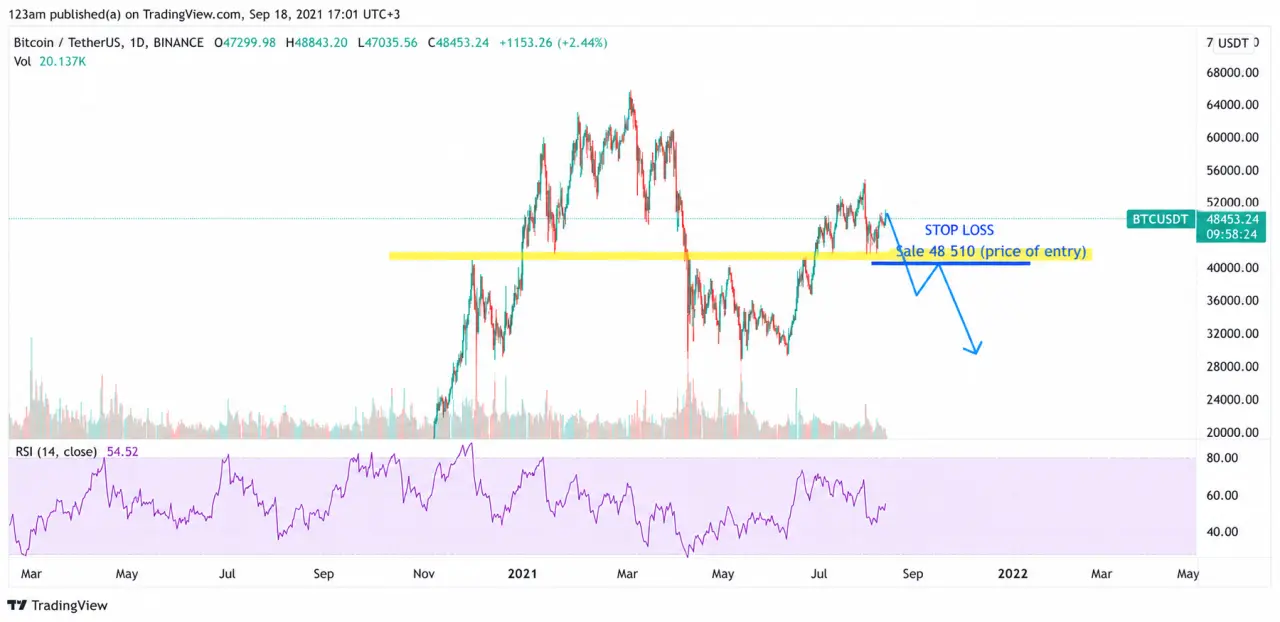
When placing a stop-limit sell order, consider the following:
Stop Price — your actual stop-loss, meaning the price at which you want to sell your position. In this example, it’s 41,850.
Limit Price — when selling, the limit price should always be LOWER than the stop price by approximately $100–300, depending on the size of your position. In this example, it would be 41,550. The larger the position, the wider this gap should be.
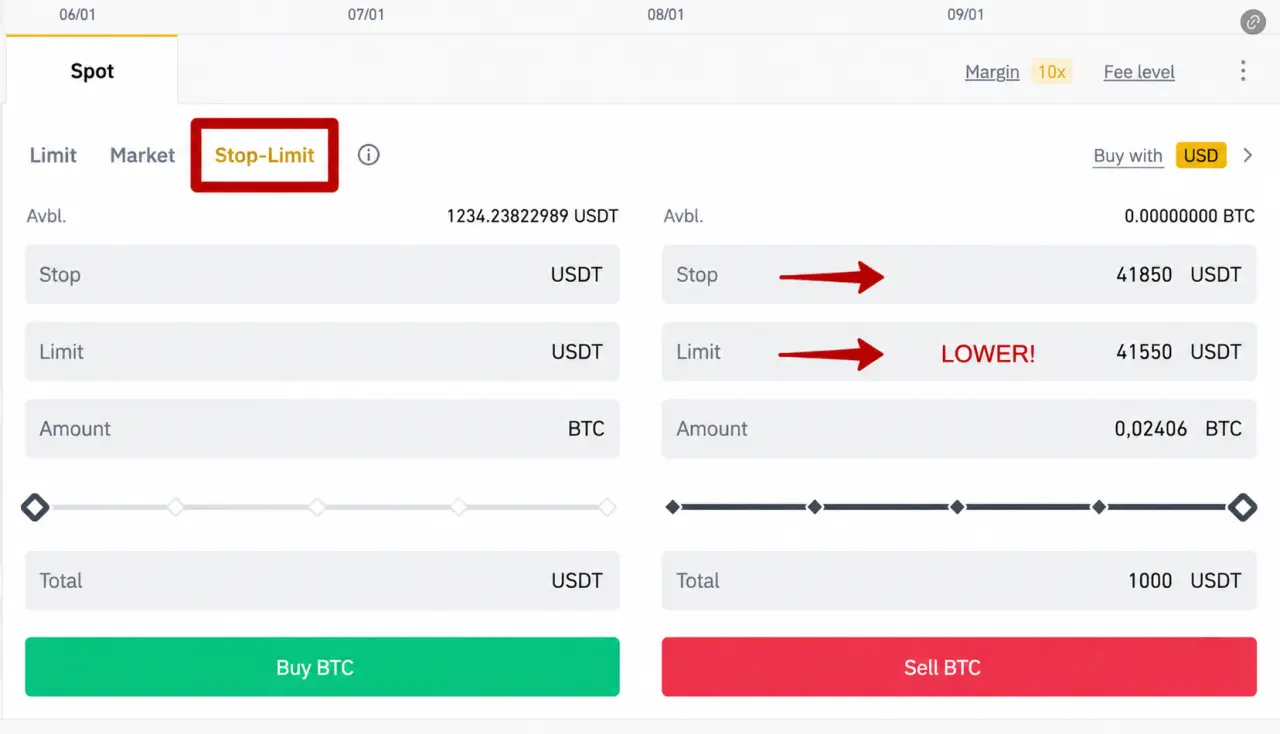
Buying a Breakout (Buying Above the Current Price)
For buying, everything works in reverse.
Suppose you want to buy a breakout above a specific level — 50,540. Imagine that the current Bitcoin price is 48,393, but you (or our analysts) have identified a level and believe that if the price breaks above it, the market could move significantly higher. Rather than sitting in front of the screen waiting for the breakout, you can use a stop-limit order.
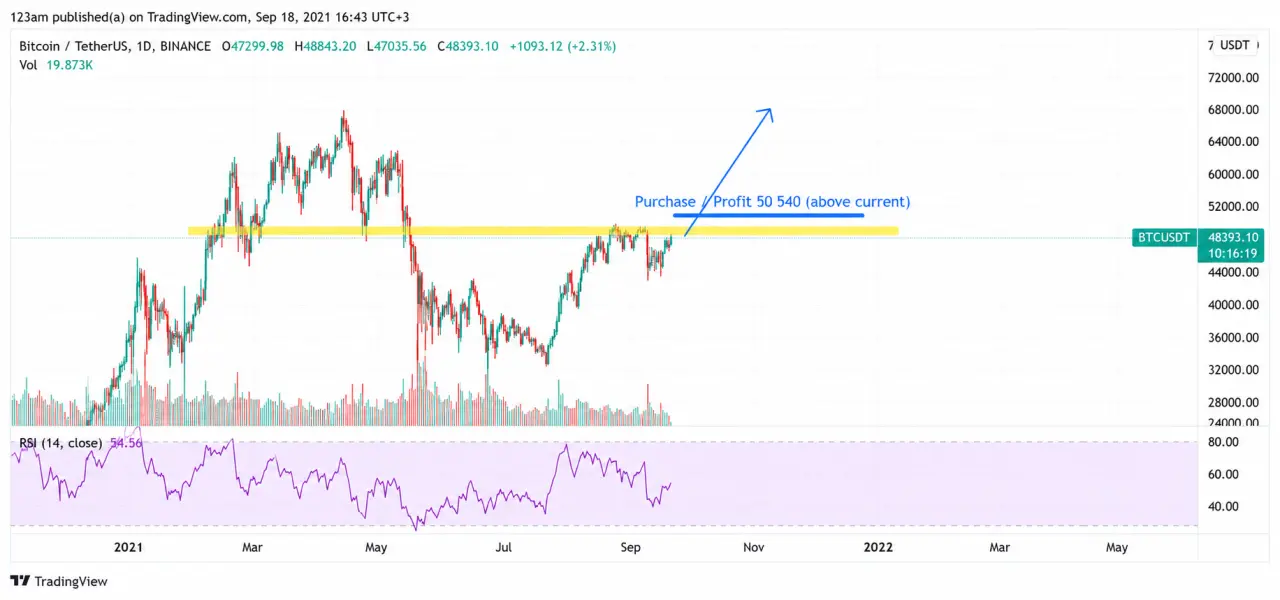
When placing a stop-limit buy order, consider the following:
Stop Price — the breakout level at which you want to buy, in this case 50,540.
Limit Price — when buying, the limit price should always be HIGHER than the stop price by approximately $100–300, depending on the size of your position.
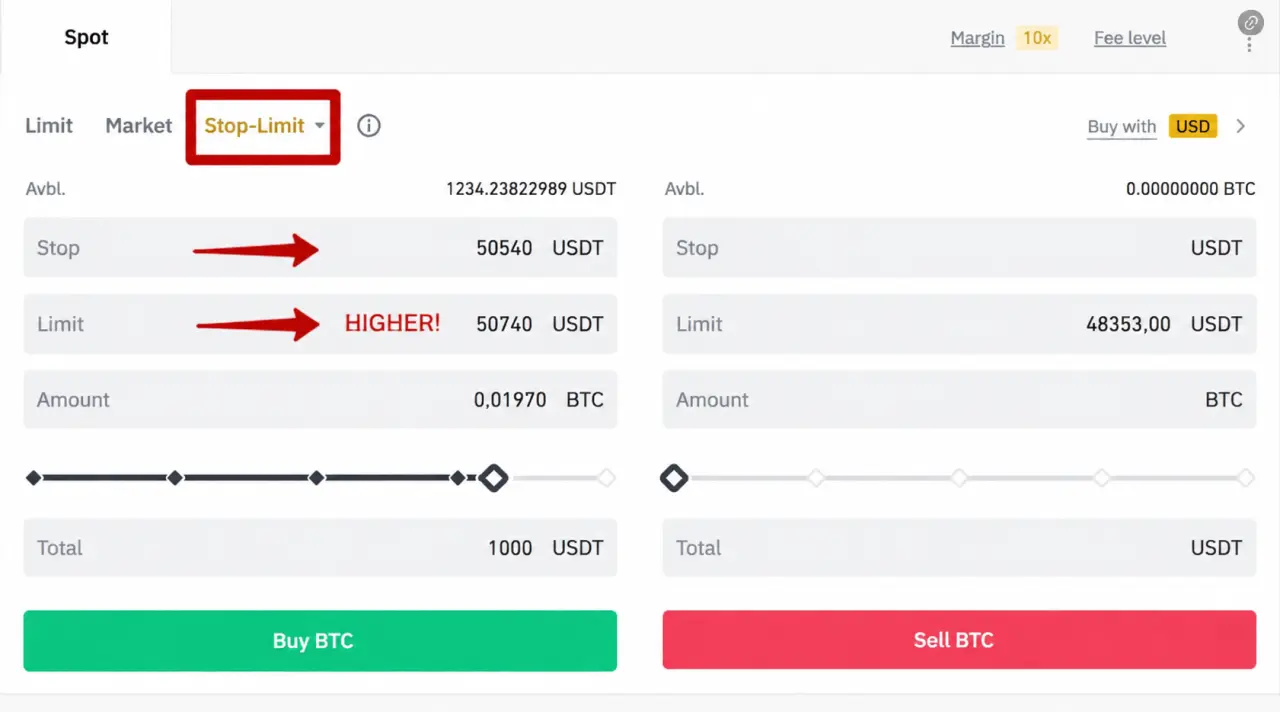
Always lower when selling and higher when buying.
How It Works:
You set a trigger price (the Stop). Once that price is reached, a limit order (the Limit) is automatically placed.When selling, placing the limit below the stop price is the correct approach. Your sell limit order (41,550) enters the order book when the market reaches the stop price (41,850), giving it the best chance to be executed immediately at the most favorable available price. If you set the limit price above the stop price when selling, then once the trigger is activated, your limit order will be placed above the current market price. If the market continues moving downward without retracing, your order may simply remain unfilled.These are the two most common uses of stop-limit orders.
Of course, stop-limit orders can also be used when you want to buy Bitcoin below the current market price or sell above the current market price, but for certain reasons do not want your limit orders to be visible in the order book.
The same rules apply:
- When selling, the limit price must be below the stop price.
- When buying, the limit price must be above the stop price.
OCO Order
And now the most favorite order of mine — the OCO order. I’m going to tell you about it, and you’ll love it too! Not every exchange can boast having such an order, but Binance does.
OCO — One Cancels the Other — is an order that combines two orders at once (a regular limit order + a stop-limit order). And the essence lies in the name: when one of these orders is triggered (either the limit order or the stop-limit order), the second is immediately canceled.
Why is it needed and why do people like it so much? You might ask, and I will answer: this is the very order that allows you to set a stop-loss and take-profit simultaneously, and also place both a buy on breakout and a buy on a price drop to your desired level.
In short, the OCO order is the king of all orders! And precisely for this reason, it usually causes confusion for most users. And here we are. Let’s begin!
Since the OCO combines two orders at once, you need to consider twice as many factors when using it — and we will start with the OCO sell order.
OCO Sell Order
Let’s consider a situation where you have already bought Bitcoin, and you decide at which level you will close your position and take your profit (sell), and also decide (or our analysts suggest) at which level you will set a stop-loss to protect your position in case the price does not go up and instead starts to fall.
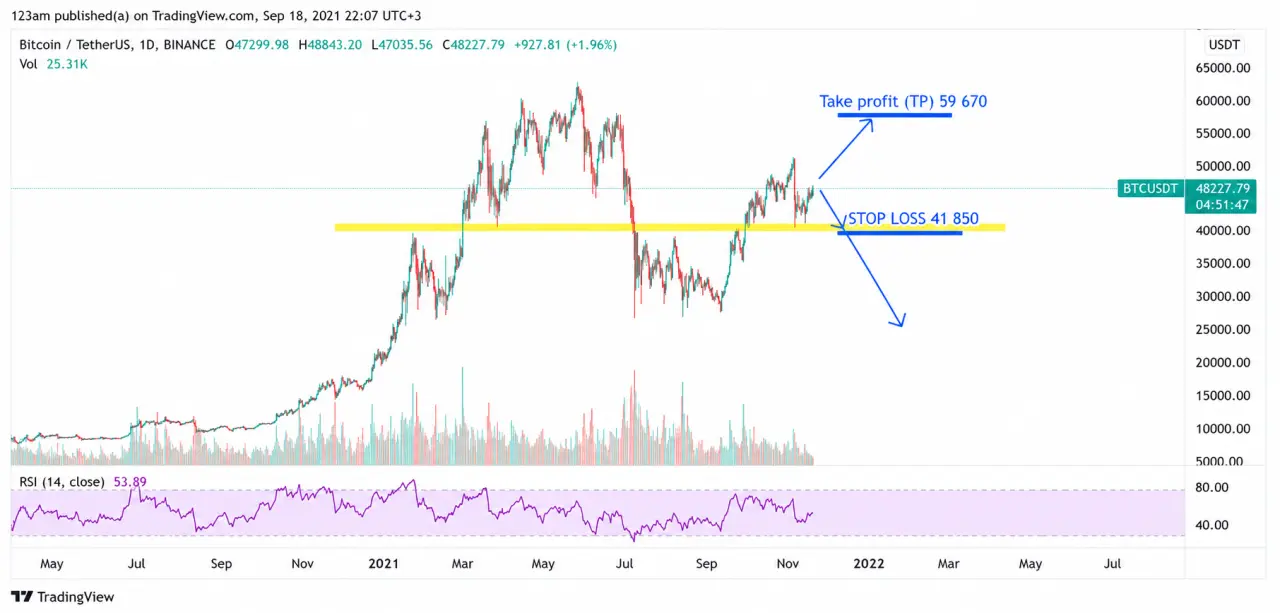
So, the OCO sell order is the order that allows you to place both a take-profit (TP) and a stop-loss simultaneously.
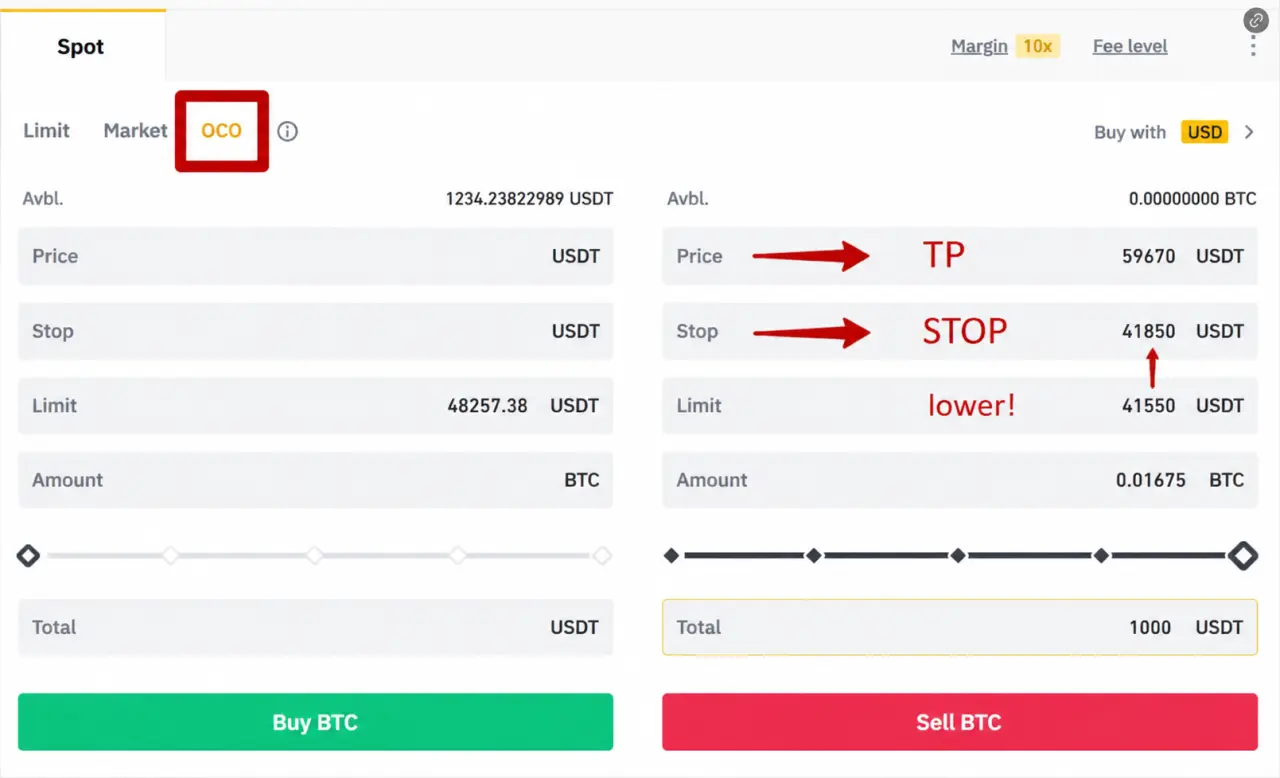
The price field is your take-profit (TP). In our example, this is 59,670 — a regular limit sell order that must be above the current price. Once the price rises, you will sell at this level and take your profit. In the Stop field, you enter the stop-loss price from the analysts’ setup — in our example, 41,850 — and in the Limit field you enter a price below the Stop level. This is your buffer so that the limit order is placed after the trigger price (Stop) is reached.
To summarize: when placing an OCO sell order, the Price field must be ABOVE the current market price, the Stop price BELOW the market price, and the Limit price BELOW the Stop.
For selling: Price > market price > Stop > Limit
OCO Buy Order
Here it is a bit more complicated, but it is also recommended to read it.
For example, you know that if the price reaches a certain level, it will surge upward like a rocket, and also if the price drops significantly, the decline will be sharp, and you are ready to buy. You do not want to miss either opportunity.
So you have identified a level from which the price may sharply move upward (a breakout), and also a level where you believe the price may be very “attractive” for buying — a drop (a strong dip), and you are ready to buy. Traders call buying the dip “setting buckets.”
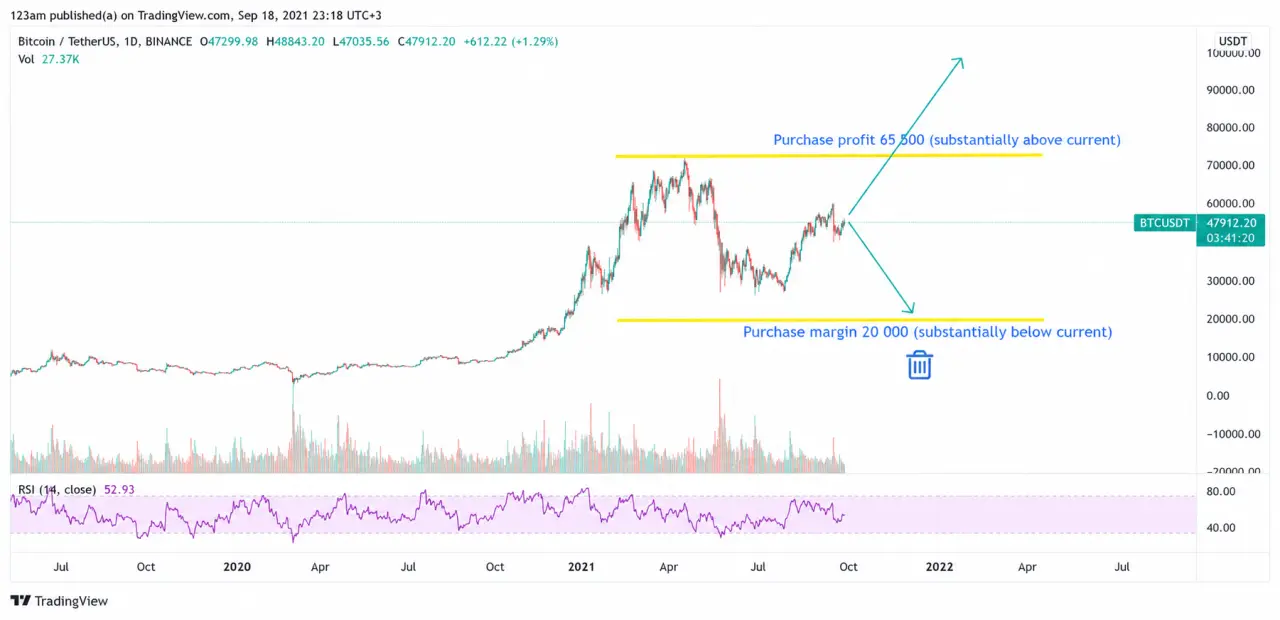
What do we do? Correct — we create an OCO order. Let’s go.
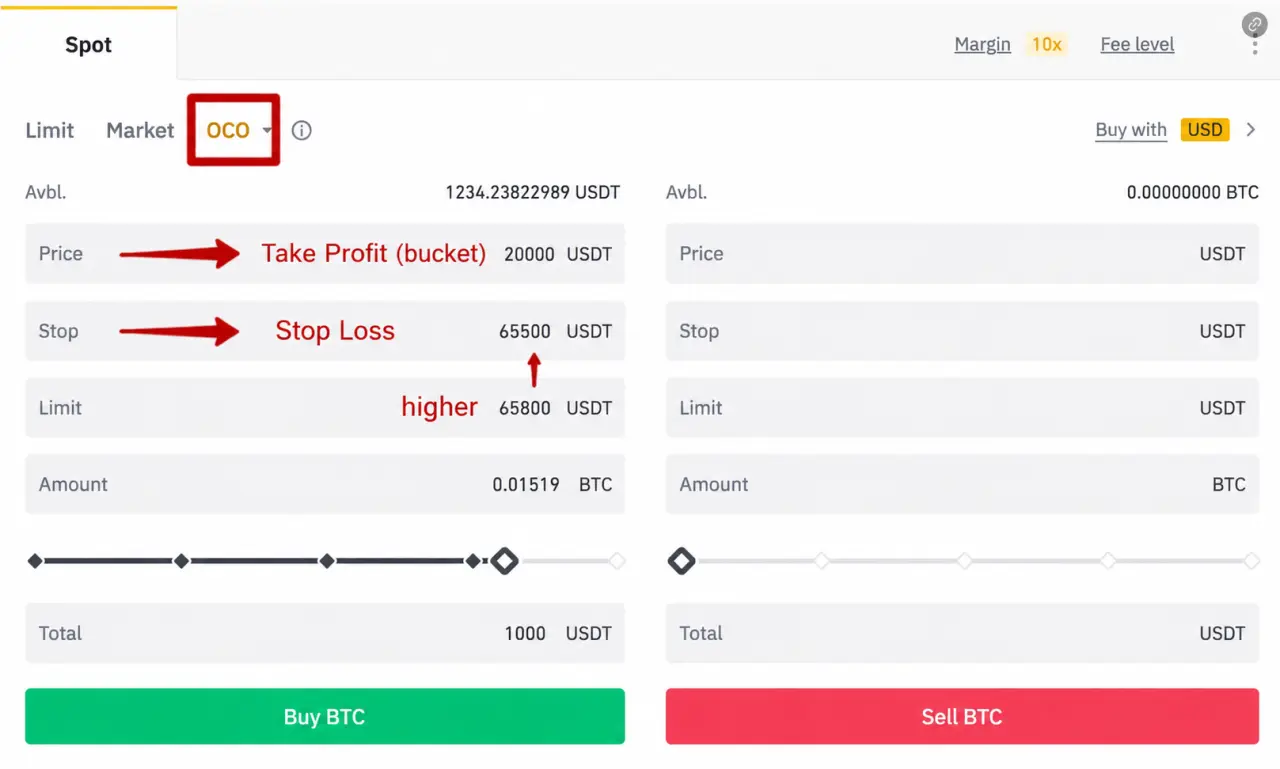
In a buy order, in the Price field you enter a price below the market price — the “bucket” price. In our example, this is 20,000. This is simply your limit buy order — if the price drops to this level, you will buy at 20,000.
The second part is the stop-limit order with Stop and Limit fields. The Stop is the breakout level at which you want to start buying — in our example, 65,500. The Limit is the actual limit order that appears in the order book once the Stop is triggered.
To summarize: the Limit must be ABOVE the Stop, which in turn must be ABOVE the current market price.
For buying: Limit > Stop > current price > Price
When you do everything correctly and finally click Buy or Sell, you will see two orders in your order list — one to buy on the dip (or sell at take-profit), and the other to buy on breakout (or sell via stop-loss). It looks like this:
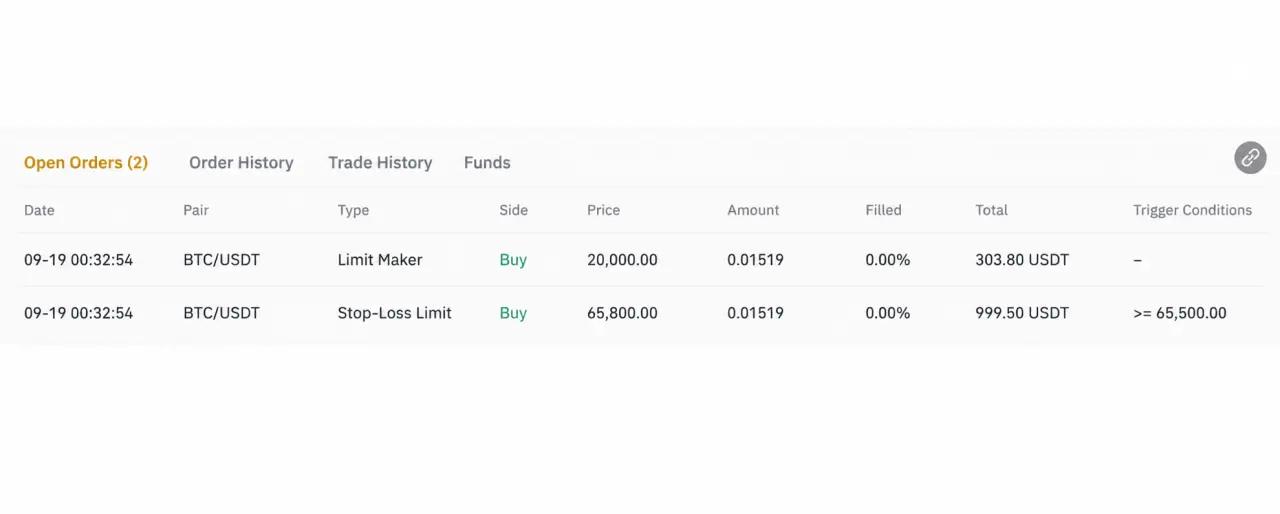
Everything worked! And it’s not that complicated, right?
At the same time, if one of the orders is triggered, the other is automatically canceled and removed (OCO — One Cancels the Other). Sounds great, doesn’t it?
Where and how to use it — as stated in the article — you can use it in dual setups (dip + breakout), when setting both stop-loss and take-profit simultaneously, and of course in other similar situations.
That’s it!
We have just gone through all the spot orders on Binance! I hope this information was useful to you and that you will be able to apply it.
Wishing you big profits, fewer stop-losses, and of course peace in our world!